SharePoint Content Library Browser
A visual file browser for SharePoint Document Libraries featuring thumbnail previews, file-type filtering, category organization, and multiple sort options—with automatic metadata extraction from folder structure.
- Client
- Various
- Year
- 2026
- Role
- Programmer
- Category
- SharePoint Apps
- Technologies
- HTML5, CSS3, JavaScript (ES6), SharePoint REST API, SharePoint Document Library, WCAG 2.1 AA Accessibility
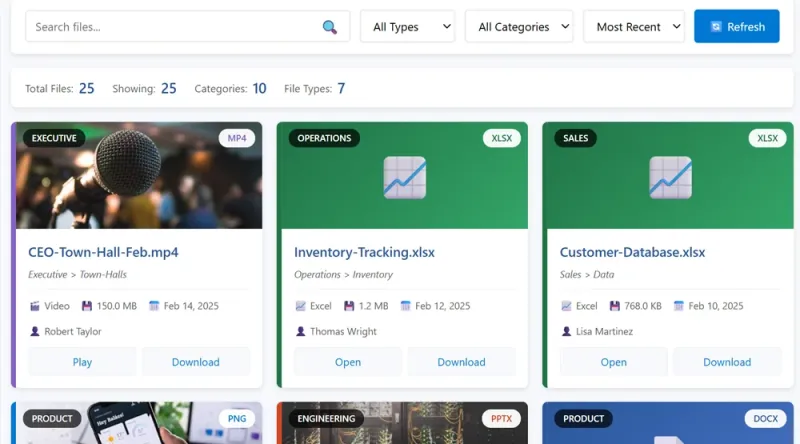 This content management interface transforms a standard SharePoint Document Library into an intuitive, card-based browsing experience. Each file displays with a thumbnail preview (or color-coded fallback based on file type), category badge derived from folder hierarchy, and rich metadata including author, size, and modification date. Users can search across filenames, categories, and authors, filter by file type (PowerPoint, Word, Excel, PDF, video, image, archive) or category, and sort by recency, name, type, or size. The system automatically extracts categories from folder structure and generates breadcrumb paths for context. File-type-specific action buttons (Open, Download, View, Play, Present) provide contextual interactions. Built with CSS custom properties for easy theming, full keyboard navigation, ARIA live regions for screen reader announcements, and skip-link accessibility. Includes demo mode with sample data for standalone testing before connecting to a live Document Library.