Pumpkin Chunkin': a SCORM physics game where the engine sets the answers
I built a SCORM 1.2 launch game where a real physics engine decides where the pumpkin lands. Here's why the first version failed, how prediction questions get their numbers from the engine, and how I kept it from turning into Angry Birds.
By Nathan Stoker · Published Nov 25, 2026 · 6 min read
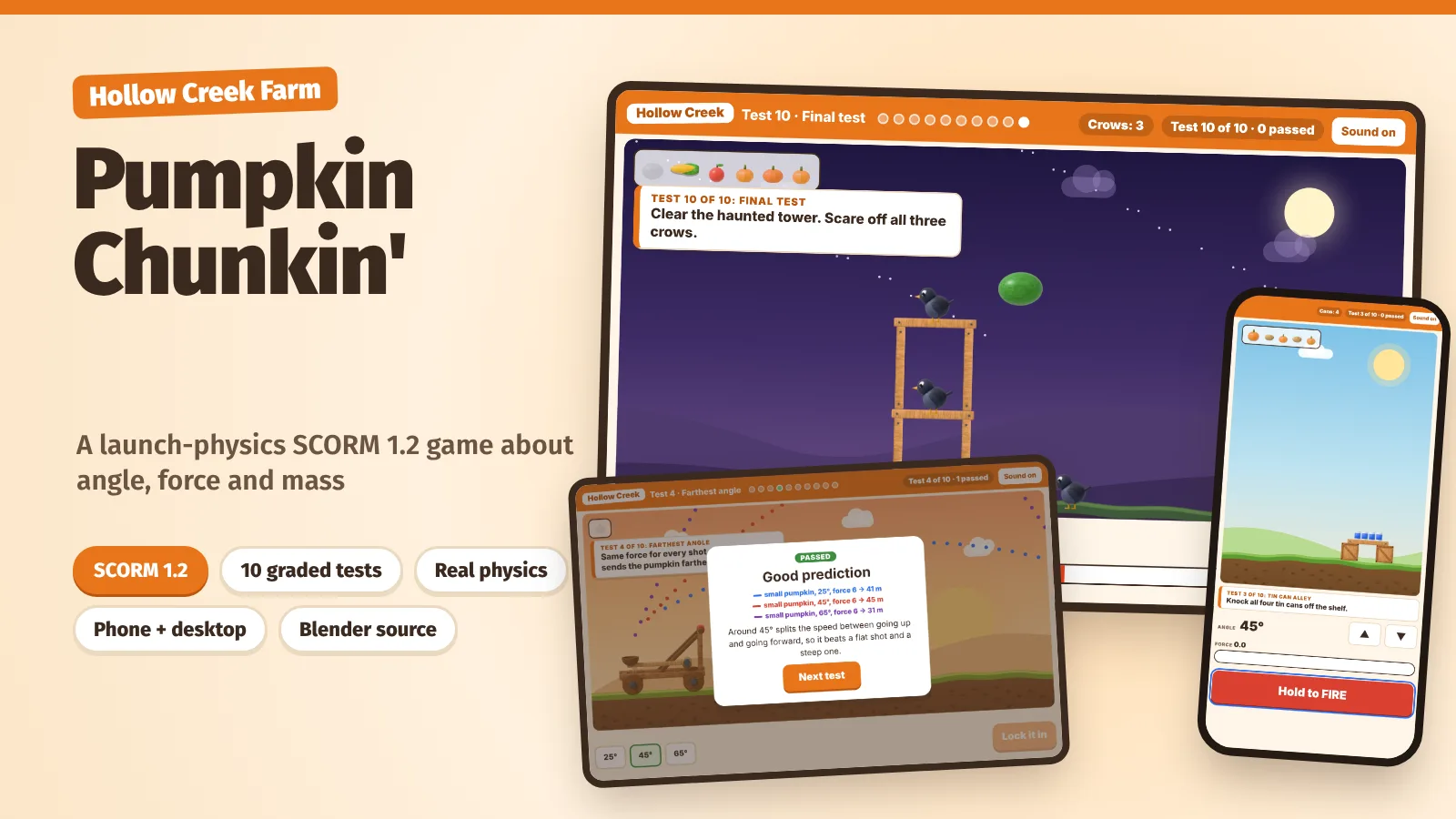
A lot of launch games in eLearning fake the physics. The pumpkin goes where the designer drew the arc, and the learner clicks a button to watch it happen. That works until someone asks why 45° goes farthest, and the honest answer is "because I animated it that way."
I wanted a launch game where the answer is the real one. So I built Pumpkin Chunkin' at Hollow Creek Farm, a SCORM 1.2 game about angle, force and mass. Learners chunk pumpkins, potatoes, apples and one very large watermelon across a farm, an orchard and Spooky Hill, and the physics engine decides where everything lands.
You can play the demo before reading the rest. It runs in any browser and records nothing.
My first version had bad physics
The first build was a light, hand-rolled arc with a hay bale in the way. It looked fine in screenshots. Then I tried to clear the hay bale and couldn't, at any power. The props acted like walls, and the arc on screen didn't match the power on the meter.
I threw it out and rebuilt it at true scale: 30 pixels to a meter and real gravity, 9.8 m/s². The engine now is Matter.js, a 2D rigid-body physics library. Crates tip over, planks slide off posts, cans fall off shelves, and a potato bounces because it's a potato and not because I told it to.
True scale matters more than I expected. Once a meter is a meter, every textbook result just shows up. A 45° shot really is the farthest on flat ground. A 70° shot really does hang in the air longer and land closer. Twice the pressure in the potato cannon really does send the potato nearly twice as far. I didn't have to code any of those lessons. I only had to stop breaking them.
Two kinds of test
The graded version has 10 tests, each graded once, and 80% passes.
Five are jobs. Scare the crows off the crate. Knock four tin cans off the shelf. Ring the orchard bell with the pitching machine. Land two pumpkins in the hay wagon. Clear the haunted tower at night. The learner aims, holds FIRE to charge the power and lets go. Each job gets one result: it either got done before the ammo ran out or it didn't.
The other five are predictions, and these are the ones I care about. The learner gets a question like this:
At 45° with force 6, the pumpkin lands at about 45 m. Same force, but the angle goes up to 70°. Where does it land?
They pick an answer and lock it in. Then both shots fire side by side, each with its own colored trail, and the result card lists the real distance of each one. Being wrong is fine. Watching the two arcs next to each other is the lesson.
The numbers in the question come from the engine
That "about 45 m" isn't typed into the question. Before a prediction test shows, the game runs the demo shots through the same Matter.js world with nothing on screen, measures where each one lands, and fills the number into the text. Here's the whole test in the config file:
{ id: "steeper_angle", type: "predict", title: "Steeper", world: "farm",
  prompt: "At 45° with force 6, the pumpkin lands at about {d0} m. Same force, but the angle goes up to 70°. Where does it land?",
  options: ["Farther than {d0} m", "About the same", "Closer than {d0} m"], answer: 2,
  demo: [{ item: "S", angle: 45, power: 6 }, { item: "S", angle: 70, power: 6 }],
  explain: "A steep shot spends its speed going up, not across. It hangs in the air longer but lands much closer." }
{d0} is the landing distance of the first demo shot. {t0} would be its time in the air. Change the angle or the force and the question rewrites itself, so the prompt and the demo can never disagree. That's the part I'd steal for any simulation-based question: let the simulation write its own numbers.
Four launchers, four kinds of power
Each launcher measures power differently, which turned out to be a nice way to show that "force" isn't one thing.
- The catapult and the trebuchet use force, 1 to 10.
- The potato cannon uses pressure, 10 to 100 psi.
- The pitching machine uses speed, 10 to 60 mph. It throws fast and flat, which is the easiest way to hit a small bell.
There are seven things to throw: a small pumpkin, a big pumpkin three times heavier, a potato, an ear of corn, an apple, an egg that splats, and the watermelon. The heavy pumpkin gets its own prediction test, because "same force, heavier load" is where a lot of people guess wrong.
Staying out of Angry Birds territory
Once I added towers and crows, the game started drifting toward a certain famous slingshot game. I had a slingshot, drag-to-aim and tap-for-a-power-up in there at one point. I pulled all three.
What's left is closer to Worms and an actual pumpkin chunkin' contest. You aim with buttons and charge with a held press. The crows aren't destroyed, they get scared off when a shot lands close. The goals vary: cans, a wagon, a bell, a barn window. And instead of stars, the kids version hands out county-fair ribbons, blue at par, red one over, white for finishing.
A free-play version for kids
The project started as something for my kids, so that version stayed. It has 15 levels across the three locations, no score and nothing sent anywhere, plus an open field where you can launch anything at anything. It ships as a bonus with the graded game, and it's a decent warm-up before the graded tests too.
The art came out of Blender
Every launcher, crow, crate and pumpkin is built by a Python script in Blender and rendered with the same side-on camera at 150 pixels per meter. The script also writes out anchor points, like where the catapult arm pivots, where the barrel's muzzle is and where the wagon bed sits, so the game can line the physics up with the art. I wrote up how that workflow goes in Blender MCP and Claude: how I built a SCORM burger game.
Get it
Pumpkin Chunkin' is in the store. You get the SCORM 1.2 zip, the editable game files with one config file for the tests and text, the Blender files and scripts, and the kids version. It reports the score, pass or fail, a bookmark and one interaction per test to your LMS.
If you only want to see whether 45° really wins, the demo will settle it.
Nathan Stoker
I build custom eLearning in Storyline, Rise and JavaScript, and I make the free tools and templates on this site. Need an interaction like this in your course? Let's talk.